Quest Compendium
A downloadable tool for Windows
Quest Compendium 🗡️
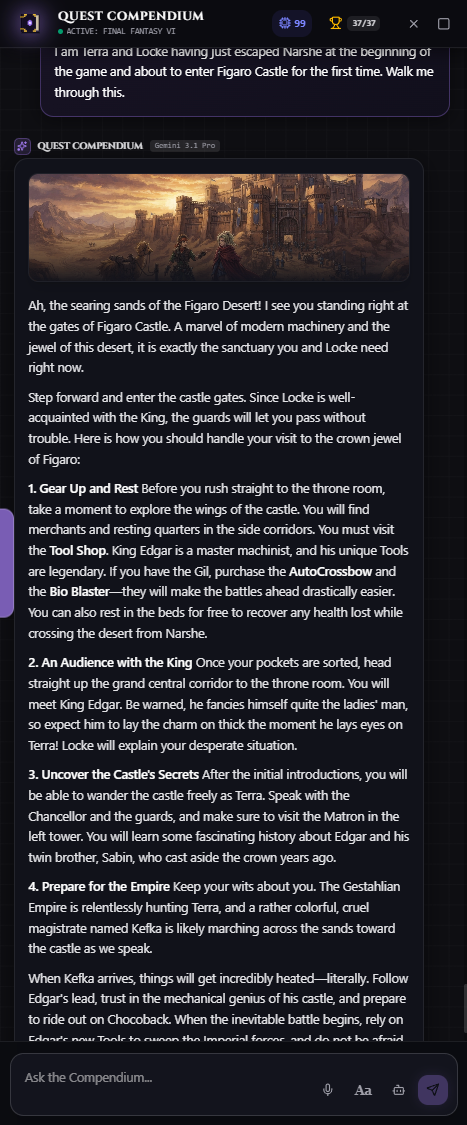
An intelligent, AI-powered desktop companion designed to overlay seamlessly on top of your favorite games. Quest Compendium provides real-time game guides, an interactive playthrough notepad, and a responsive AI assistant that understands what you're playing.
✨ Features
- Seamless Desktop Overlay: Docks cleanly to the edges of your screen or runs as a transparent, floating window while you play.
- Context-Aware AI Assistant: Powered by Google's Gemini models, the AI instantly recognizes the game you are playing and answers questions, provides strategies, or summarizes lore.
- Playthrough Notepad: A persistent, markdown-supported scratchpad to jot down lock codes, puzzle hints, or quest objectives without tabbing out.
- Steam Integration: Link your Steam account to automatically pull in your currently active game, sync your library, and track your in-game achievements live.
- Game Guides Browser: Instantly pull up optimized guides and walkthroughs for thousands of games.
- Text-to-Speech (TTS): The AI assistant can narrate its responses out loud using premium AI voices, so you don't have to take your eyes off the action.
🚀 Getting Started (Beta Release)
Welcome to the v0.1.0 Beta!
Installation
- Go to the Releases page.
- Download
Quest Compendium Setup 0.1.0.exe. - Run the installer.
- Once installed, launch Quest Compendium and sign in using your Google account to sync your notes to the cloud!
Optional: Steam Integration
To unlock automatic game detection:
- Click the Profile icon in the top right.
- Click Link Steam Account to securely connect your Steam profile.
💎 Premium Access
Quest Compendium offers a Premium tier via Stripe to support server costs and AI API usage.
- Premium Subscribers unlock 40 Pro-level AI queries a day (which roll over up to 100) and unlimited high-speed standard queries.
- Premium ensures cross-device cloud sync for your playthrough notes.
🛠️ Built With
- Frontend: React 19, Vite, Tailwind CSS, Framer Motion
- Desktop: Electron
- Backend/Database: Node.js, Express, Firebase (Auth + Firestore)
- AI Integration: Google GenAI SDK (Gemini 3.1 Pro & Flash, Gemini Flash TTS)
- Payments: Stripe
📝 Feedback & Bug Reports
This is an early beta release. If you encounter bugs, layout issues, or AI hallucinations, please submit an issue on the GitHub repository or use the built-in Beta Feedback button in the app's settings menu!
Download
Click download now to get access to the following files:
Leave a comment
Log in with itch.io to leave a comment.